
Context
Working alone on varied Figma projects, each file had its own visual codes with no consistency across files. The core problem was visual arbitrage: choosing background colors, section styles, and reproducing them across files without redoing everything by hand. Existing plugins didn't combine visual consistency and file organization in a single workflow.
The Goal
Design and build a Figma plugin end-to-end that automates visual conventions (color theme, titles, layout) in minimum clicks, without transferring complexity to the user. Built in TypeScript, using Claude Code as a development partner, managing all product, UX, and technical decisions alone.
Year
2026
N°1 Outcome
A complete Figma plugin, published on Figma Community.
Automating What Nobody Writes Down
Well-organized Figma files rely on implicit team conventions: rules no one actually writes down, that junior designers don't know, and that nobody has automated yet. This reframing shifted the value proposition from "make files prettier" to "automate Figma file conventions," a nuance that changed the plugin's entire positioning.
The project was built entirely solo, combining product thinking and technical development. Claude Code served as a development partner throughout.
Methods Used
Screens
Plugin UI
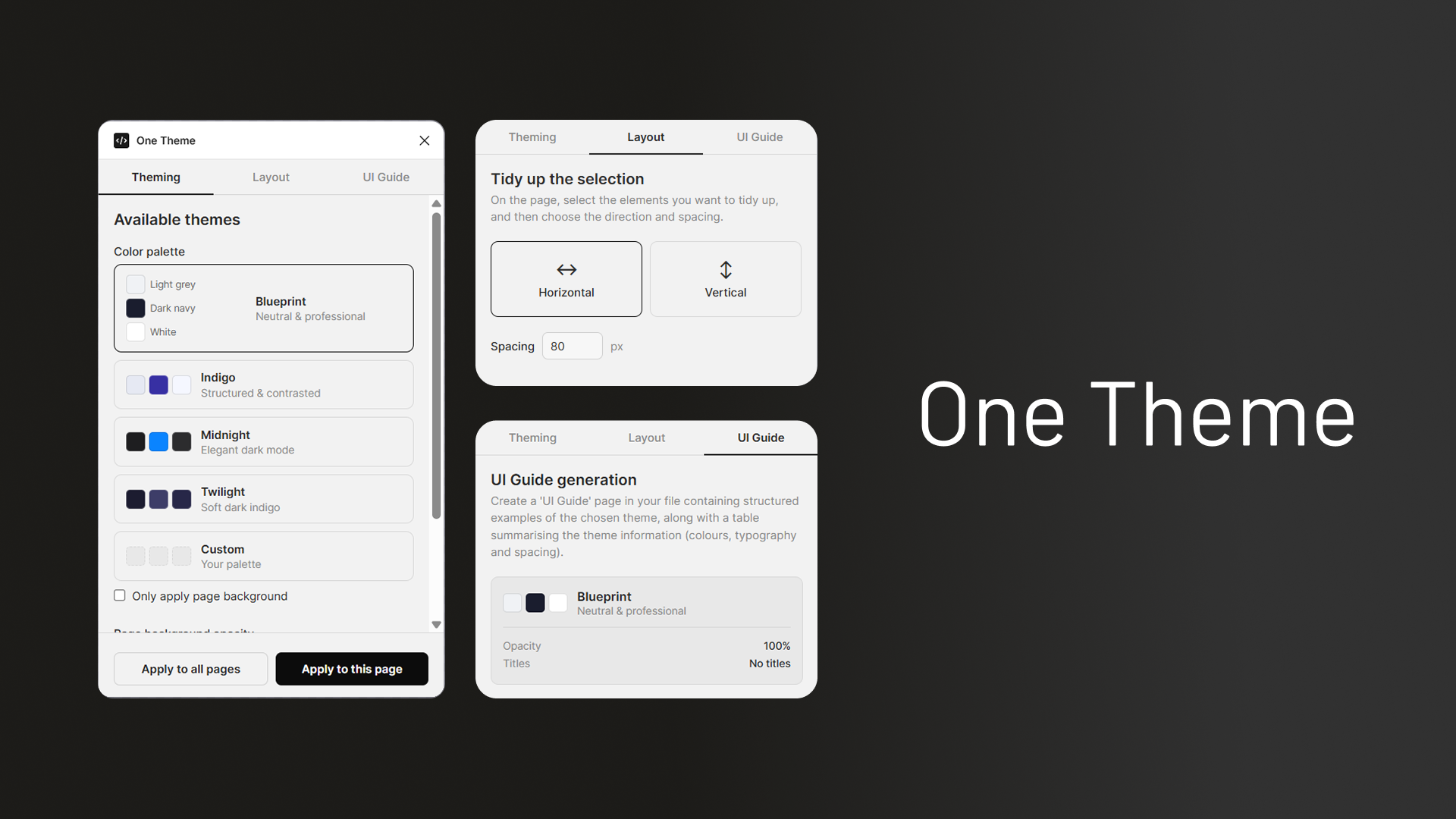
The plugin panel: 4 ready-to-use presets and 1 custom option, a layout tab and a UI Guide page creation.
Strategy & Execution
Product Discovery
Challenging the Assumption Before Building
The first question was whether this was a universal need or a personal problem. Benchmarking existing plugins confirmed no tool combined visual consistency and file organization in a single workflow. I decided to build a plugin that would fill my need and automate the implicit conventions, and to validate its adoption through community feedback.
Magic vs Control
Presets Over Configurability
A configurable plugin risks recreating the exact problem it is meant to solve. The solution: 4 ready-to-use presets with one visible degree of freedom (the font family). A Custom option was added later, with a genuine product question attached: keep it free to maximize adoption, or restrict it to validate a paid model. Decision for V1: free, to not block need validation.
TypeScript + Figma Plugin API
Incremental Debugging with Claude Code
Working with Claude Code made it possible to move fast. Concrete obstacles arose: a broken CLI at startup, TypeScript errors specific to the Figma API (SectionNode without strokes, mandatory loadFontAsync, coordinates relative to parent frames). Each bug was resolved incrementally, by understanding the root cause rather than applying blind fixes.
Interface Design
Defaults That Do the Thinking
Lo-fi wireframes framed the UI before any code was written. Key decisions: title placement disabled by default, an adaptive summary in the UI Guide tab, and a clear "Apply to this page" vs "Apply to all pages" logic. Each choice aimed to reduce cognitive load without hiding functionality.
Outcomes
Plugin Shipped
A Complete, Published Plugin
One Theme covers theming (5 presets including 1 custom with configurable opacity), optional section titles in 3 styles, layout by selection, and structured UI Guide generation. Zero external dependencies, zero backend, configuration persisted between sessions.
Design Craft
Thinking as a Product Designer on Your Own Tool
Challenging the need before writing a line of code. Arbitrating between control and simplicity. Accepting that a published V1 is worth more than a perfect V2 that does not exist.
Try It
Available on Figma Community
One Theme is published and free to use. Install it directly from Figma Community and test it on your own files.
Open in Figma Community"This plugin was built first to answer my own needs as a designer working solo across varied Figma files. Extensive research over Figma users' workflows would be needed to confirm this plugin fills a genuine, shared need beyond my own. Real validation will come from community feedback, not from the act of publishing. The open question of the Custom preset (free forever vs eventually gated) remains secondary to that."